Using the Jargon Tunnel Broker has the following advantages:
1. No Java is required on the client.
2. No complicated deployment packages.
3. No firewall issues.
4. Encryption is available.
5. A client cannot lock an agent indefinitely.
6. A small pool of agents can service a large
number of simultaneous users.
The Tunnel Broker may run on the server running the CGI/ISAPI script or it may be on another server that is accessible to the server hosting the CGI/ISAPI script. The Tunnel broker requires a Java Virtual Machine (JVM) Version 1.1 or higher (JVM 1.2 or higher for GUI control panel).
Progress AppServer may run on the server running the Tunnel Broker or it may be on another server that is accessible to the server hosting the Tunnel Broker.
The following subdirectories will be created:
./tunnel
./tunnel/doc
./tunnel/lib
./tunnel/logs
./tunnel/system
./tunnel/unix/* (multiple subdirectories)
./tunnel/win32/* (multiple subdirectories)
Use a utility like WinZip or PKZip to extract (unzip) the files contained in tunnel.zip into a directory of your choice on the server that will run the tunnel broker. The simplest choice is to unzip under "C:\", resulting in "C:\tunnel" as the tunnel broker main directory.If a Java 1.1 (or higher) JVM is not present, one should be installed. One may be downloaded at http://www.javasoft.com.
See the Windows NT/2000/2003 Install Checklist document for detailed installation and testing instructions.
Use the "tar" command to extract (untar) the files contained in tunnel.tar into a directory of your choice on the server that will run the tunnel broker.If a Java 1.1 (or higher) JVM is not present, one should be installed. One may be downloaded at http://www.javasoft.com or from your Unix vendor.
See the Unix Install Checklist document for detailed installation and testing instructions.
a) Copy tunnel\win32\scripts\jsihttp.dll to C:\InetPub\scriptsb) Copy tunnel\win32\system32\jsihttp.ini to
C:\WINNT\SYSTEM32 (on WindowsNT/2000)
C:\WINDOWS\SYSTEM32\INETSRV (on Windows 2003)c) Edit the jsihttp.ini file to configure one or more tunnel brokers. For details see the document: Configuring the Jsihttp Script for Windows NT/2000/2003. Here is an example of a jsihttp.ini file that configures three tunnel brokers, two on the same host where the script is being run (but with different broker port numbers), and the third on a Unix host:
[General]
ErrorLogFile=C:\tunnel\logs\jsihttp_error.log[DevBroker]
HostName=localhost
Port=8001
Timeout=10
TraceLogFile=C:\tunnel\logs\dev_trace.log
TraceMode=off[TestBroker]
HostName=localhost
Port=8003
Timeout=10
TraceLogFile=C:\tunnel\logs\test_trace.log
TraceMode=on[RelBroker]
HostName=sun5
Port=8001
Timeout=30
TraceLogFile=C:\tunnel\logs\rel_trace.log
TraceMode=offd) For Windows 2003 server, which installs with many options shut off by default (for security purposes), you may also have to do these steps, using the IIS Manager. Select the default web site (or other site if you have defined virtual hosts) and edit its properties.
- To enable the Tunnel Broker DLL to be run as an ASAPI executable:
- Select the "Web Service Extensions" node under the web server node.
- Click the "Properties" button (or in right-click popup menu).
- Add an entry for "Tunnel Broker DLL"
- Set it to "Allowed"
- Add a "Required files" entry with the full pathname to the jsihttp.dll file.
- To enable Version 3 Jargon apps, select the web server node
- Click "Properties"
- Select "Mime Types"
- Add a new MIME type to serve files with the extension ".ini" (for V3 apps).
- Extension: ".ini"
- MIME Type: "text/plain"
a) Compile jsihttp.c (in tunnel/unix/cgi-bin/src) using the command:cc jsihttp.c -o jsihttpor, for systems using the GNU compiler:gcc jsihttp.c -o jsihttpb) Copy the jsihttp object file and the tunnel/unix/cgi-bin/jsihttp.sh shell script file to the web server’s cgi-bin directory. Note that a precompiled jsihttp object file for Red Hat Linux is included (in tunnel/unix/cgi-bin/linux/RedHat/2.2.5-15).c) Edit jsihttp.sh to reflect the host name and broker port of the server that will run the Tunnel Broker.
d) You can run multiple Tunnel Brokers on unix. For each one, copy the jsihttp.sh to a new name (like jsihttp2.sh) and change the host name and broker port values for the AppServer broker with which each Tunnel Broker will be used.
AdminPort:Example:
Choose an open port to be used for broker administration.BrokerName:
Choose a unique name for this particular broker configuration.BrokerPort:
Choose an open port to be used for communication between the http script and the broker.InitialAgentCount:
The initial number of AppServer agents that should be controlled by the Tunnel Broker.MaxAgents:
The maximum number of AppServer agents that should be controlled by the Tunnel Broker.AppServerURL:
The host, port, and AppServer broker name.ErrorFile:
Path and file name for error log output.TraceMode:
(on/off) Enable/disable tracing of request/result sets handled by the broker.TraceFile:
Path and file name for trace log output.ASTraceMode:
(on/off) Enable/disable tracing of AppServer operations.ASTraceFile:
Path and file name for AppServer trace output.Note: Trace modes are useful for debugging purposes, otherwise should be off.
AdminPort=8000
BrokerName=TunnelBroker1
BrokerPort=8001
InitialAgentCount=2
MaxAgents=5
AppServerURL=http://localhost:5162/asbroker1
ErrorFile=../logs/tunnel.err
TraceMode=off
TraceFile=../logs/tunnel.log
ASTraceFile=../logs/astrace.log
ASTraceMode=off
Customizing the scripts for your environment:
java -classpath .;.\lib\jtunnel.jar;.\lib\o4glrt.zip b.Server ./system/tunnel.ini
would be changed (for Windows) to something like:
start C:\JRE130\bin\java -classpath .;.\lib\jtunnel.jar;.\lib\o4glrt2.zip;.\lib\o4glrt.zip
b.Server
./system/tunnel.ini
NOTE: these commands may be split onto multiple lines in this document for readability; but in the scripts they must be on one line.
java -classpath .;.\lib\jtunnel.jar;.\lib\o4glrt.zip b.Server ./system/tunnel.ini
If using an ini file other than the default file provided by this distribution, change the parameter "./system/tunnel.ini" to reflect the ini file being used.
java -classpath .;.\lib\jtunnel.jar b.AdminClient localhost 8000 stop
The first and second parameters correspond to the host name and broker admin port number. The third parameter is the action that should be taken by the AdminClient. In this case, "stop" will shut down the Tunnel Broker.
java -classpath .;.\lib\jtunnel.jar b.AdminClient localhost 8000 status
The first and second parameters correspond to the host name and broker admin port number. The third parameter is the action that should be taken by the AdminClient. In this case, "status" will return details of the broker status and the status of each agent.
java -classpath .;.\lib\jtunnel.jar b.TestClient localhost 8001 statusas.p ProcName=ShowStatus
The first and second parameters correspond to the host name and broker port number. The third parameter is the program that will be executed. The fourth parameter is the URL-encoded query string of name-value pairs that will be sent to the host. The first name-value pair should always be the name of the procedure to be invoked. The remaining name-value pairs should be the parameters that the specified procedure requires.
This example runs a test procedure that displays various AppServer environment values, such as the Propath setting. It does not require any database connection.
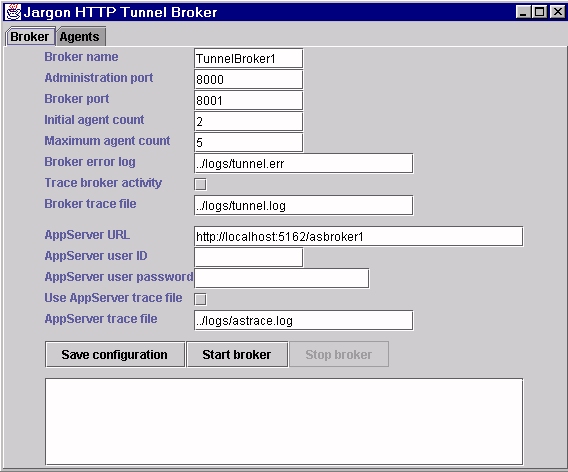
Click here to see an image of the main window in the GUI control panel.
From a dos shell (Win32) or an XTerm window (UNIX) run the "gui" script:
java.exe -classpath .;.\lib\jtunnel.jar;.\lib\jtunnelgui.jar;.\lib\o4glrt.zip a.BrokerMain ./system/tunnel.ini
If using an ini file other than the default file provided by this distribution, change the parameter ./system/tunnel.ini" to reflect the "ini" file being used.
IMPORTANT NOTE: Do NOT close the GUI control panel. If it is closed, the Tunnel Broker will also stop. However, you can minimize the window for the GUI control panel so it is only on the Start bar.