Contents of this Section:
Overview of Functions, Methods and EventsOverview of Functions, Methods and Events
For a short, readable introduction to object-oriented terminology and concepts, you might consider Object Technology: A Manager's Guide (2nd Edition), by David A. Taylor, Ph.D., Addison Wesley, 1997.
Also, if you have a set of Progress Software manuals, look at chapter 2 ("Programming Models") in the Programming Handbook for a reasonably good discussion of the differences between traditional procedure-driven programming and new event-driven programming models. When reading this chapter, which is oriented specifically to the Progress language, think of Progress "trigger procedures" as similar to "functions" in Jargon Writer, since the analogy is very close.
Some related Web sites of interest include:
Object-Oriented Concepts
and Terms
Jargon Writer and Jargon Reader are written in the JavaTM programming language, which is a pure object-oriented language, unlike C, Visual Basic, the Progress 4GL, and most other programming languages. Jargon ReaderX is written in C++ specifically for the Windows platform, using only the object-oriented features in C++ and not the "C"-like features. Jargon Reader for Palm OS is written in C, which is the preferred development language for this operating system.
The XML application objects which are created by Jargon Writer and executed by the several Jargon Reader products are "aggregate" objects consisting of a set of high-level component definitions and business logic. All methods executed on the client in response to events, and all responses from host systems, are methods invoked on objects.
Thus, both products implement pure object-oriented applications on the client, and also use object-like shell procedures for host applications. Whether the business logic that you include in these procedures is object-like or not is up to you, since many host procedure languages (unlike Java) allow both procedural and object-like programming paradigms.
The following discussion of terminology draws heavily on the definitions in Dr. Taylor's book (cited above). While there are still a number of alternative ways of naming these concepts, some growing out of different languages (C++ vs. Smalltalk), or out of the books of different "experts", Dr. Taylor's terminology is widely understood and accepted.
An object is a software "bundle" that combines a set of related data elements, called variables, with the procedures that can operate on these variables, called methods. An object is an instance of a class, which defines the contents of the object. You can think of a class as a template or cookie cutter. Each time a new object is needed, a new instance of the class is instantiated, or "stamped out" with the cookie cutter. The class contains the data and method definitions, so they do not have to be repeated in every object that is an instance of the class. The objects themselves only need to contain the actual values of the variables.
For example, consider a class called "customer". The definition of this class would contain the variables for all the information we want to know about our customers, such as customer ID, name, address, etc. The class definition would also contain the methods needed to create a new customer object, to read (get) the values of a particular customer, to assign (set) values to a customer, to calculate a customer's aged balances, and similar methods.
Each instance of the class will be a specific customer object, one for customer "A", another for customer "B", and so on. You can think of objects as being similar to records in a database table (or "rows in a table" for purists) as far as the data side is concerned. The big difference is that objects encapsulate all the programming logic that can work with an object's data into the object itself in their methods. Generally speaking, only an object itself can change its own data. Encapsulation provides several benefits to developers. It protects data from accidental corruption by other objects and hides low-level details from other parts of an application.
Classes are usually defined in a class hierarchy (or inheritance tree), with the top level being a very general class (like "screen object"), and lower levels in the hierarchy being more specialized versions of the general class. For example, the general class "customer" may have as subclasses "retail customer" and "dealer", and "dealer" may have "convenience store" and "super-store" subclasses. Subclasses can be nested to any level.
Through another object-oriented concept called inheritance, all the subclasses of a given superclass ("parent" class) can use the methods and variables of that parent class. Likewise, any subclasses of a subclass can also do so, recursively. This means that a subclass only needs to define those variables and methods that are specialized for it, without repeating all the variables and methods that are identical to those in its parent classes (all classes above a subclass in the hierarchy). This feature considerably reduces redundant coding and streamlines designs.
Besides inheritance and encapsulation, a third essential feature of an object-oriented language is polymorphism. This term, whose linguistic roots roughly translate as "many shapes", refers to the ability to have multiple classes that define a method that has the same name but is implemented differently in each class. For example, every class might have a method called "print", but a "text editor" class might implement it quite differently than would a "3D color photo" class. What is beneficial about this feature is that any object can invoke the "print" method on any other object, including new objects that might be added in the future, without having to know anything else about how the "print" method is implemented. This drastically reduces maintenance requirements when a system undergoes changes and enhancements.
Objects can only directly change their own variables, not those of other objects. Thus, for one object to affect the contents of another object, the first object must ask the second object to perform the desired action on its own contents. This is done by passing messages between objects. The interface definition of a message contains the name of the receiving object, a method name of that object, and zero or more parameters required by a method's signature.
Methods are defined with zero or more parameters, and all references to a method must include the correct number of parameters, of the correct data types, in the correct order. A method sends back exactly one return value to the invoking object, which may be nothing (void), a simple data value such as an integer or a boolean (true/false) value, or an object of a specified type (actually a reference or "handle" to an object, not a copy of the object's values).
Two objects may interact by message passing whether they are running
on one computer, on two different computers on the same internal network,
or on two computers at different locations that are connected via the Internet.
When objects on different computers are able to interact with each other,
they are referred to as
distributed objects.
The Java, Windows and Palm OS environments all include various component classes that can be used to create, modify, interrogate and delete graphical and non-graphical objects in a client application. However, these environments vary widely in the number of components and available methods that can be used.
Jargon Software has developed a comprehensive set of component classes which provide a common set of functionality across all these environments. Where native classes exist that provide needed functionality, they are used. Otherwise, additional code is provided in the Jargon classes that provides the desired functionality.
Some of these classes act as component factories by invoking
existing methods to produce and act upon GUI objects in a client application.
Other classes define the high-level processing specifications contained
in the application objects created by Jargon Writer. These high-level classes
send "orders" to the "factories", which create graphical objects such as
panels, buttons, text fields and similar components. The high-level classes
can also modify the state of these objects, such as by making them visible,
enabled, disabled or by assigning or reading their values.
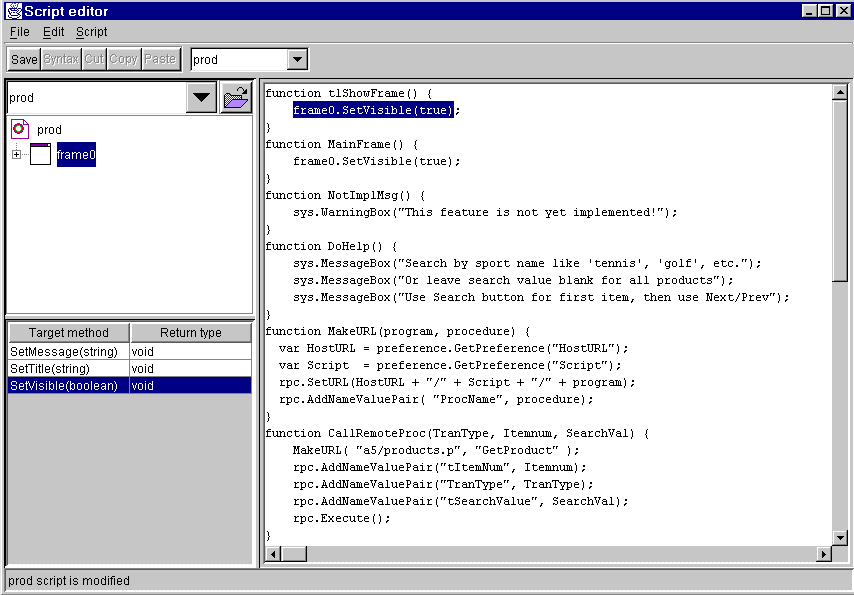
When you are adding script logic to an application in Jargon Writer, you use the public methods of the component and other statements, grouped into small procedures called functions. There are also a number of utility methods which can be used for actions that do not directly act upon a specific object, but rather pertain to the application as a whole (at the "root" level). These methods and the objects on which they act are defined in the Script Editor Window.
Technical Note: Public methods can be invoked by any other object, whereas private methods can only be invoked by other methods within the same object and are not "visible" to other objects. Protected methods can only be invoked by the object itself or by objects in subclasses of an object's class.A host can also invoke an existing function that contains one or more such methods, which can be a more efficient way to do the same thing, rather than invoking each method separately from the host.
Finally, any client method (except those which use other objects as parameters) can also be directly specified by a host procedure by sending an "invoke" message to the client. This powerful, generic capability allows host procedures full ability to dynamically create and modify the state of client components.
The methods available for use in client functions are shown in alphabetical order in a listbox at the lower left of the Script Editor Window, for the component which is highlighted in the target tree above it. Classes are listed in alphabetical order.
Each method is documented in online HTML-based help files which can
be viewed in a browser. These help files can be accessed from links on
the Index to Online Help Documents.
When are methods actually executed or run? When an application developed in Jargon Writer is first opened and loaded by Jargon Reader, various initialization methods are executed. This initialization process instantiates the various graphical objects defined in the application, sets the initial state of each object, stores all defined functions and event linkages, and instantiates event-handling objects which listen for any linked events .
An application may also define an "initial tasklist" which is a function that is executed immediately after the initialization. For example, an initial tasklist might run a host call that causes certain comboboxes and listboxes to be dynamically populated with values from database table contents.
Then, the application simply "sits and waits" until the user performs some action with the keyboard, mouse, stylus or other input device, which causes an event to take place. If that event is linked with one or more functions (which Jargon Writer implements by registering event listener objects to watch for specified events on such an event source object), the statements in the linked functions will be executed when the event occurs. These statements may be purely local actions, host calls, or any combination of the two. After the linked function has been completed for an event, the application returns to the "sit and wait" mode until another event occurs.
What kind of events can occur? There are two different types of events: low-level and semantic. Low-level events correspond to specific physical actions of the mouse or keyboard, such as a mouse click or a key being pressed. However, the meaning of these low-level events varies, depending on what kind of object is involved.User Tip: This model, where user actions control the logic flow of the program, is called the "event-driven" programming model. Learning to think about programming in this way requires a mental paradigm shift which can sometimes be difficult for developers who have only used the traditional procedural model, where the program "leads" the user through a controlled sequence of actions and limits the choices available to the user at each step. Likewise, learning to think naturally in terms of "objects" instead of "data and programs" can be challenging. Don't worry. The light bulb will come on, that wonderful "ah-ha!" sensation will occur as all the pieces come together, and soon you will wonder why anyone would ever develop software any other way!
For example, clicking a "Save" button usually causes a program to save the current values of its data contents, but clicking on a text field merely puts keyboard focus on the field (focus means that any keystrokes will be applied to that field on the screen). A user changes focus by clicking on a different object, or by using the Tab and Shift-Tab keys to move from the object which currently has focus to the next or previous object in the component traversal sequence (usually left to right and top to bottom).
For this reason, semantic events are normally more useful, since they correspond to the meaning of a mouse or keyboard action. For example, a user can cause the semantic event called "Action Event" for certain components either by clicking the mouse or by pressing the Enter key (both have the same meaning and will cause the same linked statements to be executed) . The events that can be linked to functions in Jargon Writer are primarily semantic events. Whenever possible, semantic events should be used instead of low-level events, since this approach could automatically handle new input methods that cause the same semantic actions. In the future, a user might be able to trigger an Action Event by saying "Make it so!" (while imitating Patrick Stewart, of course).
List of Events
The events that can be linked to functions in Jargon Writer include the following.
Note that on a PDA, tapping on a field with a stylus is the equivalent of clicking
on a field with a mouse action.
Event Name
Actions That Cause Event To Fire
Available On Components
ActionEvent
Clicking/tapping on a button or hyperlink, changing a checkbox or combobox value, pressing
Enter or Carriage Return (CTRL-M) in a text component. Barcode scanners can fire it by appending a
CR (decimal 13) character after a barcode value, which is an option on many scanners.
button, checkbox, combobox, hyperlink, passwordfield, textfield,
textarea, hyperlinkCellEditor
FocusGainedEvent
Clicking/tapping into or using TAB key to put focus into a component. Focus
can also be set automatically (without any user action) by script methods.
passwordfield, textfield, textarea
FocusLostEvent
Clicking/tapping outside of or using TAB key to remove focus from a component.
passwordfield, textfield, textarea
TabEvent
Pressing the TAB or Shift-TAB key while in certain text components.
Supported only on PocketPC and WinCE devices (not desktop Windows or PalmOS devices).
passwordfield, textfield
ListSelectionEvent
Clicking/tapping on a row or using arrow keys to move up/down to a row to select it.
table
ColumnSelectionEvent
Clicking/tapping on a column header or using arrow keys to move left/right to a row to select it.
table
EditEvent
Ending editing of a table cell value by pressing Enter or TAB or clicking elsewhere.
textcellEditor
ChangeEvent
Clicking/tapping on or using TAB key to select a different tab in a tabpanel than the one
that is currently selected.
tabpanel
TreeSelectionEvent
Clicking/tapping on or using up/down arrow keys to select a different tree node than the one
that is currently selected.
tree
WindowClosingEvent
Clicking/tapping on the "X" (close) button in the upper right-hand corner of the frame titlebar.
The function linked to this event will be invoked before the close takes place. If the function called
returns a non-zero value, the close will be cancelled.
frame